
If you are scraping public web data at business scale, your biggest problem is usually not writing the scraper. It is keeping the scraper stable, accurate, and allowed through enough times to collect useful data without breaking the target website or triggering unnecessary blocks.
That is where residential proxies come in.
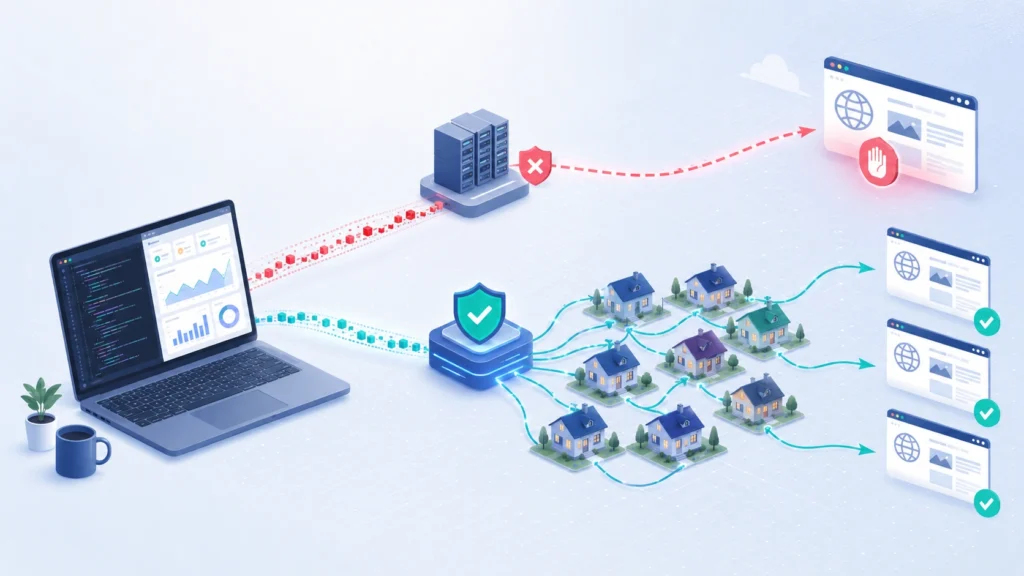
A residential proxy routes your web requests through IP addresses assigned by real internet service providers. To the target website, the request appears to come from a normal household connection rather than a cloud server, data center, or obvious automation environment. This matters because many websites treat data center IPs as higher risk. They may throttle them faster, challenge them with CAPTCHA, return fake data, or block them completely.
This guide is written for teams that need a practical setup, not a surface level explanation. You will learn how residential proxies fit into a scraping stack, when to use rotating versus sticky sessions, how to configure them in Python, and what early mistakes can ruin your success rate before your scraper even reaches production.
Before you start, you should have a few things ready.
| Requirement | Recommended Setup | Why It Matters |
|---|---|---|
| Programming language | Python 3.10 or newer | Stable ecosystem for scraping libraries |
| HTTP client | Requests, HTTPX, or aiohttp | Sends controlled web requests through proxies |
| Browser automation | Playwright or Selenium | Needed for JavaScript heavy pages |
| Scraping framework | Scrapy | Useful for structured crawling and queues |
| Proxy type | Residential rotating or sticky | Helps manage blocks, location, and sessions |
| Data storage | CSV, PostgreSQL, BigQuery, or S3 | Keeps collected data usable after scraping |
| Compliance check | robots.txt, terms review, rate limits | Reduces legal and operational risk |
You do not need every tool on day one. A simple scraper can start with Python Requests and a residential proxy endpoint. A more advanced stack may use Scrapy for crawling, Playwright for rendering, Redis for queues, and a database for deduplication.
The key is not to throw proxies at a bad scraper. Residential proxies help with access and reliability, but they do not fix poor request pacing, weak headers, broken parsing logic, or careless crawling behavior.
What Residential Proxies Actually Do in Web Scraping
A normal scraper running from a VPS, cloud server, or local machine sends requests from one visible IP address. If that IP sends too many requests, hits sensitive pages repeatedly, ignores crawl patterns, or behaves differently from a real browser, the website can flag it.
A residential proxy changes the visible network identity of your request. Instead of the target website seeing your server IP, it sees the IP address provided by the proxy network. With a rotating residential proxy, that IP may change every request or after a defined time window. With a sticky residential proxy, the same IP stays assigned to your session for a set period, such as 5, 10, or 30 minutes, depending on the provider.
This matters because web scraping is not just about downloading HTML. It is about maintaining a believable and consistent request profile.
A website may evaluate:
- The IP address and its reputation.
- The country, city, or ISP behind the IP.
- The request frequency from the same IP.
- The headers sent with each request.
- Whether cookies remain consistent across a session.
- Whether JavaScript challenges are completed.
- Whether the navigation pattern looks natural.
Residential proxies mainly solve the IP reputation and location part of this equation. They help you distribute traffic across a larger pool of real residential IPs. They also allow location based scraping, such as checking search results in Germany, product pricing in the United States, or localized inventory pages in specific cities.
But proxies should not be used as a shortcut for abusive crawling. If a site blocks a section in robots.txt, requires login, protects private user data, or clearly disallows automated collection, you need to review whether scraping is appropriate. For professional use, residential proxies should support compliant data collection, not bypass access controls.
Rotating vs Sticky Residential Proxies: Which One Should You Use?
The first technical decision is rotation behavior. Many scraping failures happen because teams choose the wrong proxy mode for the target website.
Rotating residential proxies are best when each request can stand alone. For example, scraping search result pages, product listing pages, public directory pages, review snippets, or price pages often works well with rotation. Each request gets a fresh IP or rotates at a defined interval, which spreads traffic across the proxy pool.
Sticky residential proxies are better when the website expects session continuity. If you need to load a category page, click pagination, preserve cookies, maintain a cart state, or interact with a JavaScript app, changing IPs too often can look suspicious. A sticky session keeps the same IP long enough for the website to see a consistent visitor.
| Use Case | Best Proxy Mode | Recommended Session Length |
|---|---|---|
| Search result scraping | Rotating | 1 request per IP or short rotation |
| Product listing pages | Rotating or sticky | 1 to 10 minutes |
| Pagination scraping | Sticky | 5 to 30 minutes |
| JavaScript heavy websites | Sticky | 10 to 30 minutes |
| Local SEO checks | Sticky by location | 5 to 15 minutes |
| Price monitoring | Rotating with geo targeting | Per request or per batch |
| Login based workflows | Avoid unless permitted | Stable session only |
A simple rule works well: rotate aggressively when requests are independent, and keep sessions sticky when the website expects continuity.
Step by Step Implementation Part 1

Step 1: Define the Target, Scope, and Data Rules Before Coding
Start by writing down exactly what you are collecting. This sounds basic, but it prevents most scraper design problems later.
A clean scraping scope should answer these questions:
What pages are you scraping?
What fields do you need?
How often does the data need to refresh?
Which countries or cities matter?
Does the target require JavaScript rendering?
Does the site allow crawling of those paths?
What request volume is safe and necessary?
For example, “scrape ecommerce prices” is too vague. A better scope is: “Collect product title, price, stock status, rating, and seller name from 25,000 public product pages in the US region once every 24 hours.”
That scope tells you what proxy setup you need. Since the data is public, location sensitive, and refreshed daily, you could use US residential proxies with moderate rotation, controlled concurrency, retries, and deduplication.
At this stage, avoid high concurrency. For a new target, start with 2 to 5 concurrent requests. Use a request timeout of 10 to 30 seconds. Add a delay between requests, then increase slowly only after you understand the target’s response pattern.
The mistake to avoid here is treating proxies like unlimited bandwidth. Residential proxies are usually priced by traffic, and careless scraping can burn through bandwidth fast. HTML pages are light, but browser rendered pages with images, scripts, fonts, and tracking files can consume far more data.
Step 2: Choose the Right Residential Proxy Format
Most residential proxy providers give you one of two connection formats.
The first format is a gateway endpoint. You connect to one hostname and port, then the provider rotates the outgoing residential IP behind the scenes.
Example format:
http://username:password@gateway.provider.com:8000
The second format uses parameters inside the username. This lets you control country, city, session ID, or rotation behavior.
Example format:
http://customer-zone-us-session-abc123:password@gateway.provider.com:8000
The exact syntax depends on your proxy provider, but the concept is the same. Your scraper authenticates with the proxy gateway, and the provider decides which residential IP is assigned based on your parameters.
For professional scraping, choose a provider that supports these technical controls:
| Feature | Why You Need It |
|---|---|
| HTTP and HTTPS support | Required for most web scraping |
| SOCKS5 support | Useful for browser automation and flexible routing |
| Country targeting | Needed for localized content |
| City or state targeting | Useful for local SEO, ads, pricing, and inventory |
| Sticky sessions | Required for session based scraping |
| Rotation controls | Helps balance success rate and cost |
| Usage dashboard | Lets you track bandwidth and errors |
| API access | Useful for managing sessions and monitoring usage |
Do not choose proxies only by advertised pool size. A smaller, cleaner pool with stable sessions can outperform a huge pool with poor success rates. What matters is real performance on your target websites: response time, block rate, CAPTCHA rate, and data accuracy.
Step 3: Configure a Residential Proxy in Python Requests
For a simple scraper, Python Requests is the fastest way to test a residential proxy.
Here is a basic setup:
import requests

proxy_url = "http://username:password@gateway.provider.com:8000"

proxies = {
    "http": proxy_url,
    "https": proxy_url,
}

headers = {
    "User-Agent": "Mozilla/5.0",
    "Accept-Language": "en-US,en;q=0.9",
}

response = requests.get(
    "https://example.com",
    proxies=proxies,
    headers=headers,
    timeout=20
)

print(response.status_code)
print(response.text[:500])
This sends both HTTP and HTTPS traffic through the residential proxy. The timeout prevents your scraper from hanging when a proxy connection is slow or the target website does not respond.
For real projects, never hardcode proxy credentials inside the script. Use environment variables instead.
import os
import requests

proxy_user = os.getenv("PROXY_USER")
proxy_pass = os.getenv("PROXY_PASS")
proxy_host = os.getenv("PROXY_HOST")
proxy_port = os.getenv("PROXY_PORT")

proxy_url = f"http://{proxy_user}:{proxy_pass}@{proxy_host}:{proxy_port}"

proxies = {
    "http": proxy_url,
    "https": proxy_url,
}
This keeps credentials safer and makes deployment easier across local machines, servers, and CI environments.
Step 4: Test Your Proxy Before Scraping the Target Site
Before sending traffic to the target website, verify that the proxy works. Use an IP checking endpoint first.
import requests

proxy_url = "http://username:password@gateway.provider.com:8000"

proxies = {
    "http": proxy_url,
    "https": proxy_url,
}

r = requests.get(
    "https://api.ipify.org?format=json",
    proxies=proxies,
    timeout=20
)

print(r.json())
Run the script multiple times. If you are using rotating residential proxies, the visible IP should change depending on your provider’s rotation rules. If you are using a sticky session, the IP should stay the same until the session expires or the session ID changes.
This test helps you catch basic problems early:
Wrong username or password.
Blocked proxy gateway.
Unsupported protocol.
Expired proxy plan.
Incorrect country targeting.
Timeout caused by a slow endpoint.
If your proxy fails on an IP check endpoint, do not test it on your real target yet. Fix the proxy connection first. Otherwise, you will confuse proxy errors with scraping errors.
Step 5: Add Controlled Retries and Status Code Handling
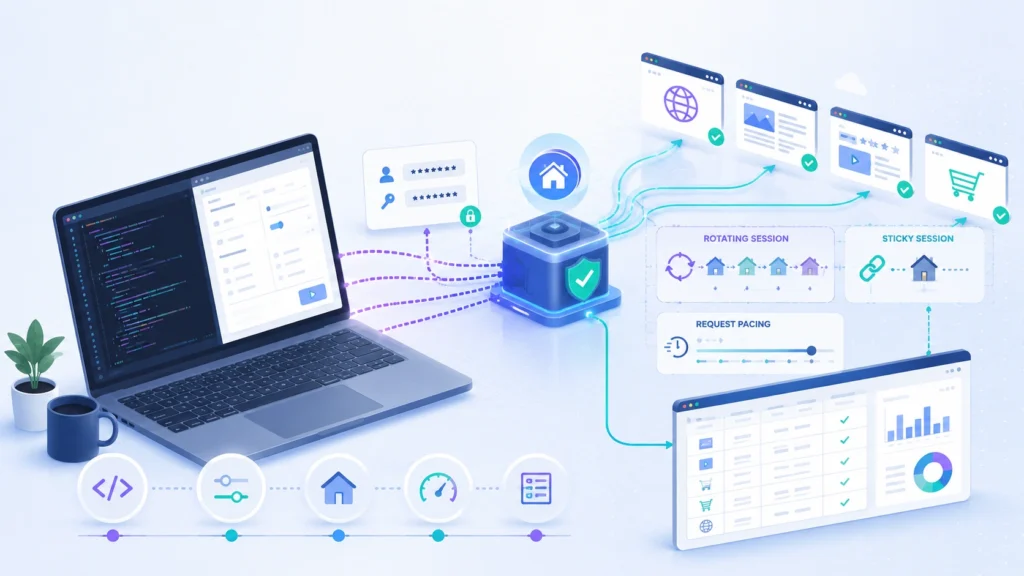
A production scraper should expect failure. Residential IPs can be slow. Target websites can return temporary blocks. Some pages may timeout. A clean retry strategy helps you recover without hammering the website.
At minimum, track these response codes:
| Status Code | Meaning in Scraping | Action |
|---|---|---|
| 200 | Page loaded successfully | Parse and store data |
| 301 or 302 | Redirect | Follow only if expected |
| 403 | Forbidden or blocked | Rotate proxy, lower rate, review headers |
| 404 | Page not found | Store as missing, do not retry often |
| 429 | Too many requests | Slow down and rotate session |
| 500 to 504 | Server side issue | Retry with delay |
Use retries carefully. Retrying a blocked request ten times in one second only makes the pattern worse. A better approach is to wait, rotate the proxy session, and reduce concurrency.
For early testing, use a maximum of 2 retries per URL, a backoff delay of 3 to 10 seconds, and logging for every failed request. Once you know the target’s behavior, you can tune those values.
This is the foundation of using residential proxies correctly. You are not just hiding your IP. You are building a controlled request system that respects session behavior, location, timing, and failure handling.
Step 6: Use Residential Proxies in Scrapy for Larger Crawls
Python Requests is useful for testing, but once you start crawling thousands of URLs, Scrapy is usually a better choice. It gives you request scheduling, retries, middleware, pipelines, throttling, and structured exports without forcing you to build everything from scratch.
For residential proxies, the cleanest Scrapy setup is to assign the proxy at the request level. This gives you more control than forcing every request through one global proxy.
import scrapy

class ProductSpider(scrapy.Spider):
    name = "products"

    proxy_url = "http://username:password@gateway.provider.com:8000"

    def start_requests(self):
        urls = [
            "https://example.com/product-1",
            "https://example.com/product-2",
        ]

        for url in urls:
            yield scrapy.Request(
                url=url,
                callback=self.parse_product,
                meta={"proxy": self.proxy_url},
                headers={
                    "User-Agent": "Mozilla/5.0",
                    "Accept-Language": "en-US,en;q=0.9",
                },
                dont_filter=False,
            )

    def parse_product(self, response):
        yield {
            "url": response.url,
            "title": response.css("h1::text").get(),
            "price": response.css(".price::text").get(),
        }
In your Scrapy settings, keep concurrency conservative at the beginning.
CONCURRENT_REQUESTS = 4
DOWNLOAD_TIMEOUT = 25
RETRY_TIMES = 2
DOWNLOAD_DELAY = 2

AUTOTHROTTLE_ENABLED = True
AUTOTHROTTLE_START_DELAY = 2
AUTOTHROTTLE_MAX_DELAY = 15
AUTOTHROTTLE_TARGET_CONCURRENCY = 2.0
This configuration is not aggressive, and that is the point. When residential proxies are involved, stability matters more than raw speed. A scraper that completes 100,000 URLs cleanly over several hours is more valuable than one that sends traffic too quickly, triggers blocks, and returns incomplete data.
The common mistake is increasing CONCURRENT_REQUESTS too early. If your block rate rises, your first move should not be buying more proxy bandwidth. Lower concurrency, review response codes, check headers, confirm session handling, and inspect whether the target is returning partial or misleading HTML.
Step 7: Use Playwright When the Page Requires JavaScript
Some websites do not return useful HTML in the first response. The data appears only after JavaScript runs in the browser. In those cases, Requests or Scrapy alone may return an empty shell page, while the real content loads through background API calls.
Playwright is useful when you need browser rendering. You can configure a residential proxy at launch.
from playwright.sync_api import sync_playwright

with sync_playwright() as p:
    browser = p.chromium.launch(
        headless=True,
        proxy={
            "server": "http://gateway.provider.com:8000",
            "username": "username",
            "password": "password",
        }
    )

    page = browser.new_page()
    page.goto("https://example.com", timeout=60000)

    title = page.locator("h1").inner_text()
    print(title)

    browser.close()
For sticky sessions, pass the session parameter through your proxy username if your provider supports it. Keep that same session ID for the full browser context, especially when the workflow includes pagination, filters, location selection, or cookie based state.
Playwright is powerful, but it can become expensive fast. A browser session downloads more assets than a plain HTTP request. Images, fonts, JavaScript files, tracking scripts, and CSS can increase bandwidth usage. For data extraction, block unnecessary resource types when it does not affect the page content.
def block_unneeded(route):
    if route.request.resource_type in ["image", "font", "media"]:
        route.abort()
    else:
        route.continue_()

page.route("**/*", block_unneeded)
Be careful with blocking scripts. Many modern websites need JavaScript to render the content you want. Blocking images and fonts is usually safer than blocking scripts.
Step 8: Build Rotation Logic Around Sessions, Not Randomness
A weak proxy strategy rotates IPs randomly without understanding the website flow. A stronger strategy groups requests by session type.
For example, if you are scraping category pages, keep one sticky IP for page 1 to page 10. If you are scraping independent product pages, rotate by batch. If you are checking local results, keep the same location and session long enough to avoid inconsistent data.
A practical rotation model looks like this:
| Scraping Pattern | Rotation Strategy | Reason |
|---|---|---|
| Independent product URLs | Rotate every request or small batch | Each URL does not need shared state |
| Category pagination | Sticky session per category | Pagination should look consistent |
| Local search pages | Sticky geo targeted session | Location accuracy matters |
| JavaScript workflow | Sticky browser context | Cookies and state need continuity |
| Failed 403 or 429 response | Rotate after cooldown | Avoid repeated blocked requests |
The goal is not to rotate as much as possible. The goal is to rotate only when it improves reliability. Too much rotation can break cookies, trigger unusual behavior, and create inconsistent results across pages.
Advanced Optimization Tips for Better Success Rates
The first optimization is request pacing. Do not send requests at machine speed. Add delays, use AutoThrottle in Scrapy, and watch how response times change. If response latency rises sharply, the website may be slowing your traffic before blocking it.
The second optimization is header consistency. A scraper that sends a desktop user agent but no language header, no compression support, and no normal navigation pattern can look unnatural. You do not need to fake every browser detail, but you should avoid obviously incomplete request headers.
The third optimization is location matching. If you use a US residential proxy, keep your language, currency, and target URLs consistent with that region. A German IP requesting US localized pages with mismatched language headers may still work, but it can produce unreliable data.
The fourth optimization is data validation. Do not assume a successful HTTP 200 means the scrape worked. Some websites return soft block pages, empty templates, or alternate content while still returning a 200 response. Add validation rules such as minimum HTML length, required selector presence, price format checks, and duplicate detection.
For example, a product page should usually contain a product title, price, and canonical URL. If those fields are missing, flag the page for review instead of storing it as valid data.
Troubleshooting Common Residential Proxy Problems
If your scraper is returning 403 errors, slow down first. Then test the same URL with a fresh session, better headers, and lower concurrency. A 403 does not always mean the proxy is bad. It can also mean the scraper is sending a poor request pattern.
If you are seeing many 429 errors, your request rate is too high for that target. Reduce concurrency, increase delay, rotate less aggressively within sessions, and add backoff.
If Playwright pages keep timing out, check whether the page is waiting for unnecessary assets. Try waiting for a specific selector instead of waiting for full network idle. Many modern pages keep network connections open, so waiting for complete silence can waste time.
If data looks inconsistent, confirm the proxy location. Scraping from different countries can change prices, taxes, stock status, shipping options, search results, and even page layout.
If bandwidth usage is too high, avoid browser rendering unless needed. Start with plain HTTP requests, inspect background API calls, and use Playwright only for pages where JavaScript rendering is truly required.
FAQs About Using Residential Proxies for Web Scraping
Are residential proxies legal for web scraping?
Residential proxies are a networking tool. The legality depends on what you scrape, how you scrape it, and whether you respect applicable laws, website terms, copyright rules, privacy rules, and access restrictions. For business use, focus on publicly available data, avoid private account areas, and get legal review for sensitive projects.
Should I use rotating or sticky residential proxies?
Use rotating proxies for independent pages where each request can stand alone. Use sticky proxies when the website expects session continuity, such as pagination, filters, JavaScript workflows, or location based browsing.
Can residential proxies remove CAPTCHA problems?
They can reduce some IP reputation issues, but they should not be treated as a CAPTCHA bypass tool. If CAPTCHA appears often, slow down, improve request quality, check whether the target allows automated access, and reconsider the scraping approach.
How many concurrent requests should I start with?
Start with 2 to 5 concurrent requests for a new target. Increase only after reviewing block rate, timeout rate, response latency, and data quality. High concurrency too early is one of the fastest ways to ruin a scrape.
Is Playwright always better than Requests?
No. Playwright is better for JavaScript heavy pages, but it is slower and uses more bandwidth. Requests or Scrapy should be your first choice when the HTML response already contains the data.
Final Takeaway
Using residential proxies for web scraping is not just a proxy setup task. It is a traffic design problem. You need the right proxy type, the right session model, careful retries, realistic pacing, and validation checks that prove the returned page is actually useful.
Start small. Test the proxy. Confirm the IP location. Scrape a limited sample. Log every status code. Validate the extracted fields. Then scale gradually.
That disciplined approach is what separates a fragile scraper from a professional data collection system.